> ## Documentation Index
> Fetch the complete documentation index at: https://knowledge.komo.tech/llms.txt
> Use this file to discover all available pages before exploring further.
# Read me when your competition ends!
> Want to know what to do once your competition ends? Read on...
This article will pick up from the point when your competition has ended and provide all the information you need to know when closing off your card's competitions. Read on for a step-by-step guide on what your options are once this occurs.
## Unpublishing
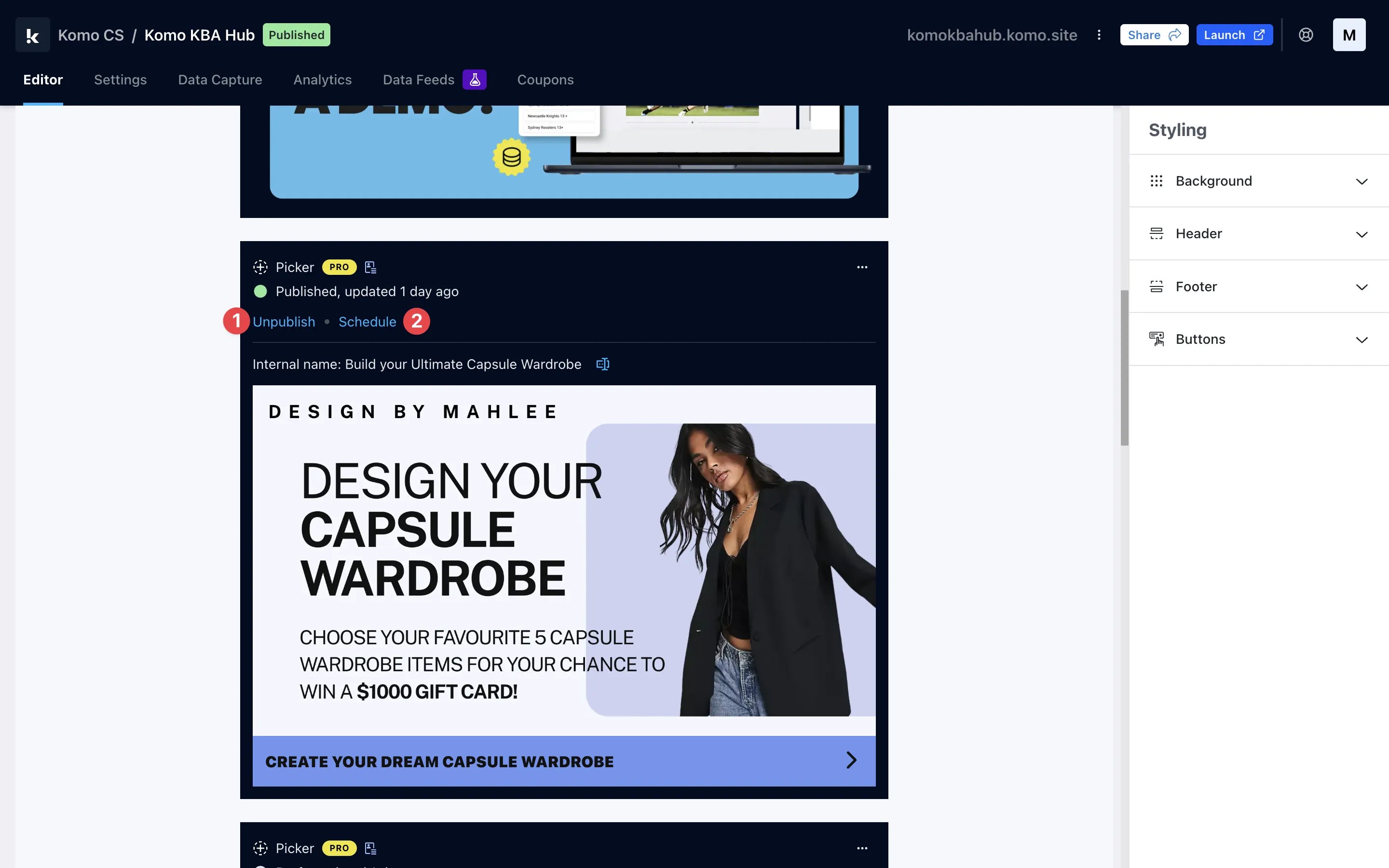 You have a couple of different options when taking your content down from the Engagement Hub.
* **(1)** If you have manually published your card, you can simply click on the **unpublish** option here. This will manually take down the content from your hub.
* **(2)** Alternatively, you can **schedule** a time for your content to be automatically unpublished from your hub here.
You have a couple of different options when taking your content down from the Engagement Hub.
* **(1)** If you have manually published your card, you can simply click on the **unpublish** option here. This will manually take down the content from your hub.
* **(2)** Alternatively, you can **schedule** a time for your content to be automatically unpublished from your hub here.
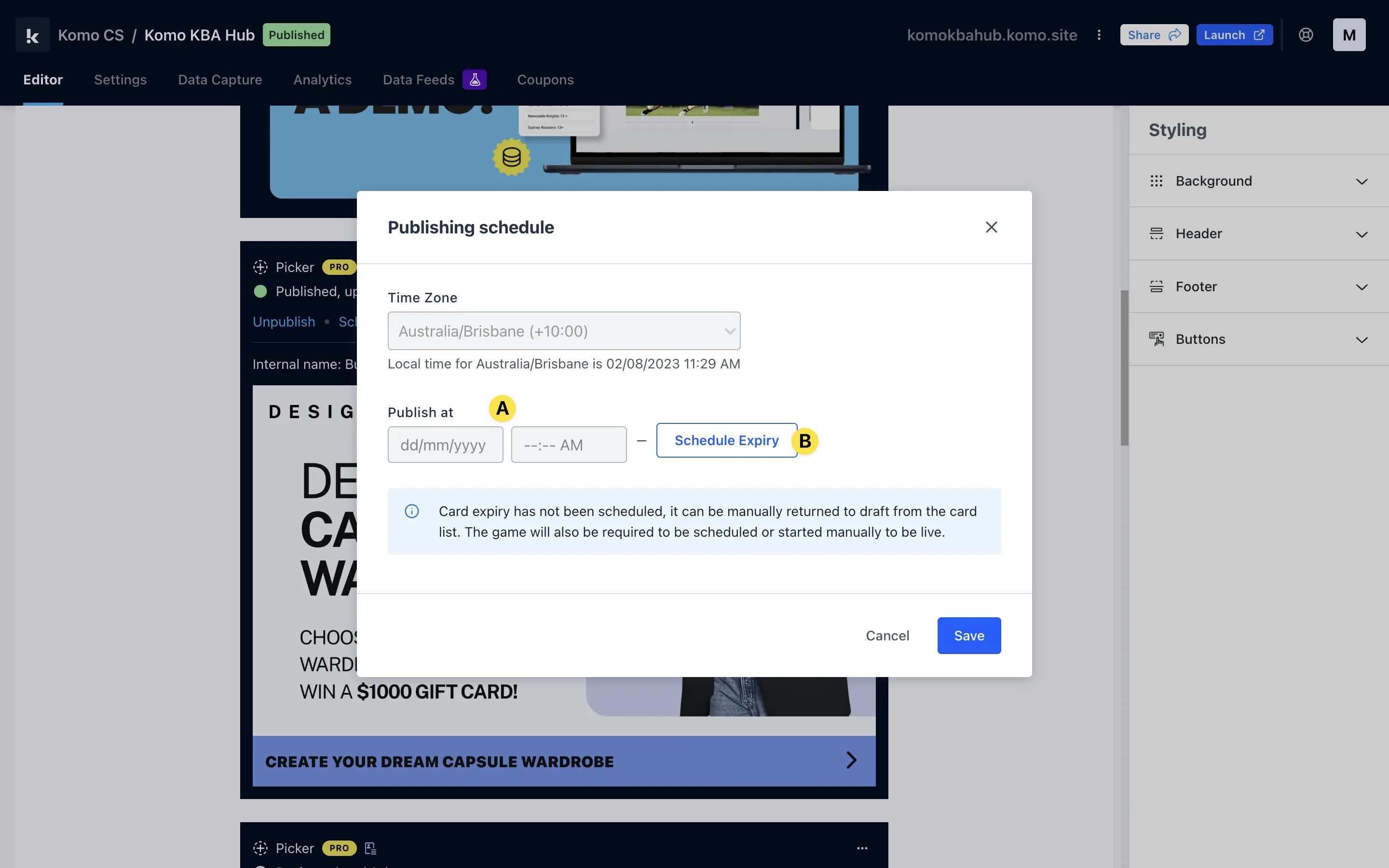 * **(A)** You would use this option to make your content go live at a **set date**.
* **(B)** Set the **date/time** your card will be automatically unpublished from the Engagement Hub.
## Awarding Prizes
* **(A)** You would use this option to make your content go live at a **set date**.
* **(B)** Set the **date/time** your card will be automatically unpublished from the Engagement Hub.
## Awarding Prizes
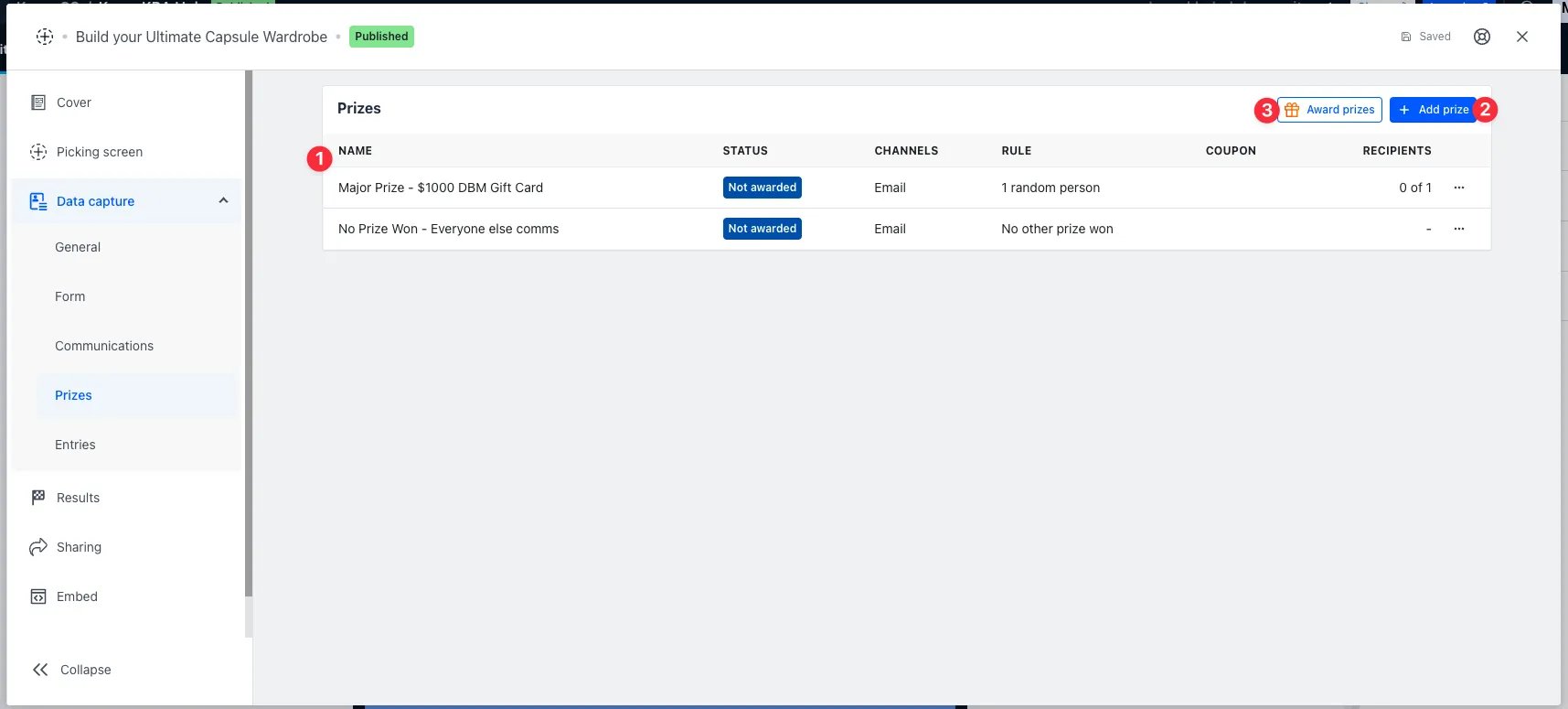 We recommend setting up prizes prior to running your competition, however, if you haven't set them up you can do this by clicking on the Prizes tab.
* **(1)** This area will provide you with an **overview** of all the prizes you've created for this card.
* **(2)** By clicking here you can begin the process of **creating a new prize**.
We recommend setting up prizes prior to running your competition, however, if you haven't set them up you can do this by clicking on the Prizes tab.
* **(1)** This area will provide you with an **overview** of all the prizes you've created for this card.
* **(2)** By clicking here you can begin the process of **creating a new prize**.
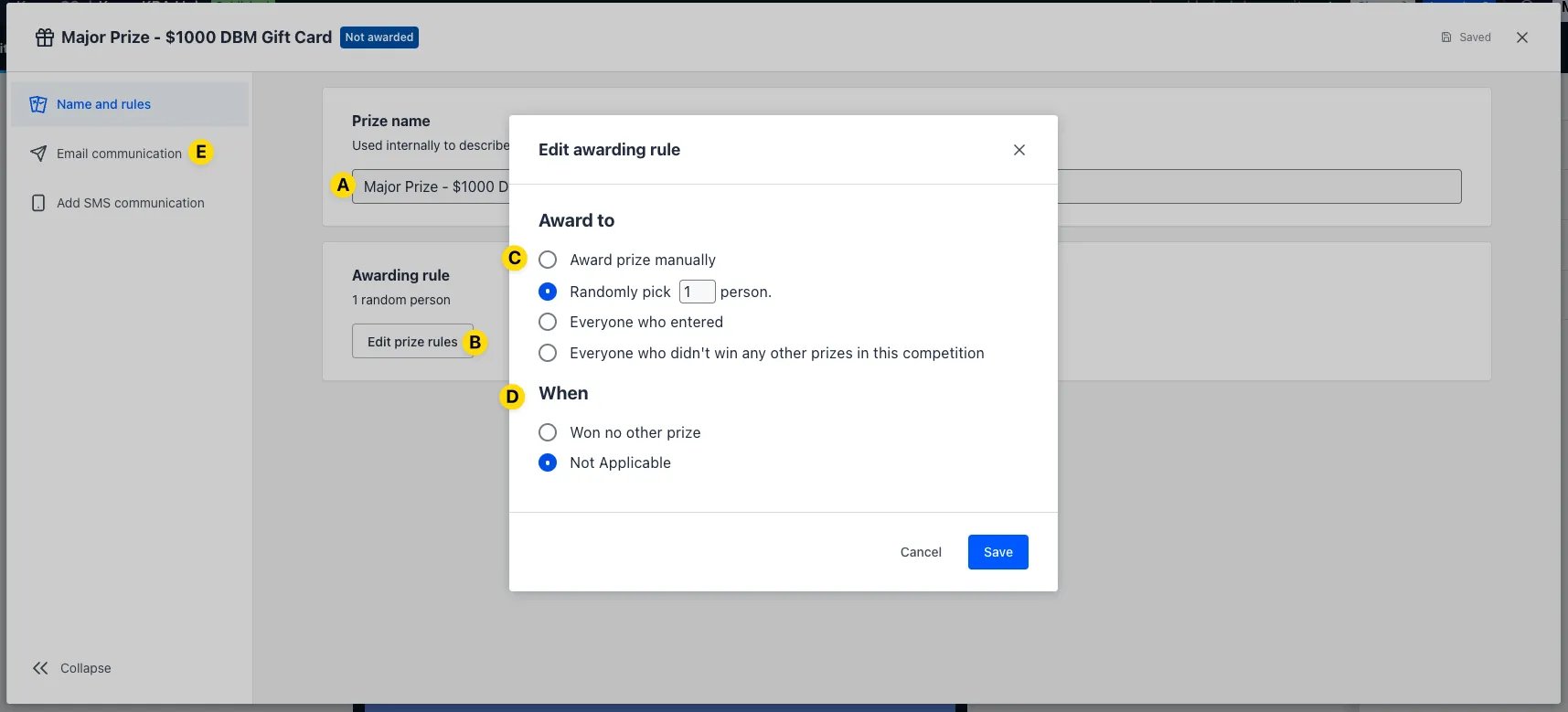 After selecting **Add Prizes** you will be redirected to this window.
* **(A)** Add an **internal name** to your prize.
* **(B)** Click **edit prize rules.**
* **(C)** Start building out your prize award rules. The awarding rules are detailed below.
* **Award prize manually -** Requires you to select an entrant/entrants to receive the prize.
* **Randomly pick X persons -** After clicking **Award prizes** the prize will be randomly allocated to X number of entrants.
* **Everyone who entered -** Every entrant will receive a prize.
* **Everyone who didn't win -** Every entrant who hasn't won any other prize will receive this prize.
* **(D)** Depending on how you configured the above, these options will **further refine** when entrants will receive this prize.
* **(E)** Customize the **communication** associated with that prize, within the communication you can attach coupons.
* **(3)** Once your card's competition has closed, click this button to **award the prizes**.
If you have chosen to award your prizes manually, the process for awarding will look slightly different.
After selecting **Add Prizes** you will be redirected to this window.
* **(A)** Add an **internal name** to your prize.
* **(B)** Click **edit prize rules.**
* **(C)** Start building out your prize award rules. The awarding rules are detailed below.
* **Award prize manually -** Requires you to select an entrant/entrants to receive the prize.
* **Randomly pick X persons -** After clicking **Award prizes** the prize will be randomly allocated to X number of entrants.
* **Everyone who entered -** Every entrant will receive a prize.
* **Everyone who didn't win -** Every entrant who hasn't won any other prize will receive this prize.
* **(D)** Depending on how you configured the above, these options will **further refine** when entrants will receive this prize.
* **(E)** Customize the **communication** associated with that prize, within the communication you can attach coupons.
* **(3)** Once your card's competition has closed, click this button to **award the prizes**.
If you have chosen to award your prizes manually, the process for awarding will look slightly different.
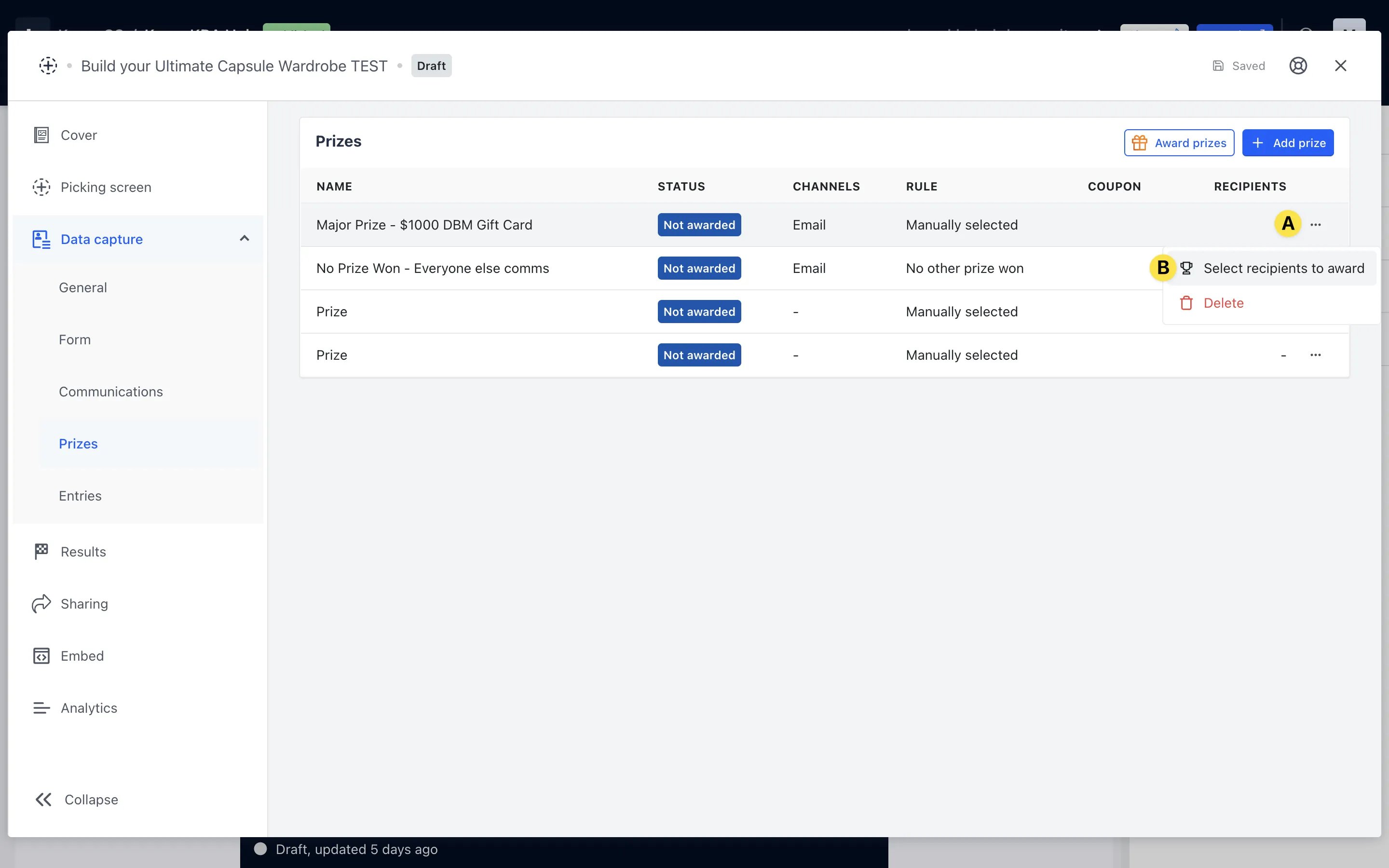 * **(A)** Instead of clicking on award prizes, click the 3 dots next to any prize you have configured to award manually.
* **(B)** Click **select recipients to award.**
* **(A)** Instead of clicking on award prizes, click the 3 dots next to any prize you have configured to award manually.
* **(B)** Click **select recipients to award.**
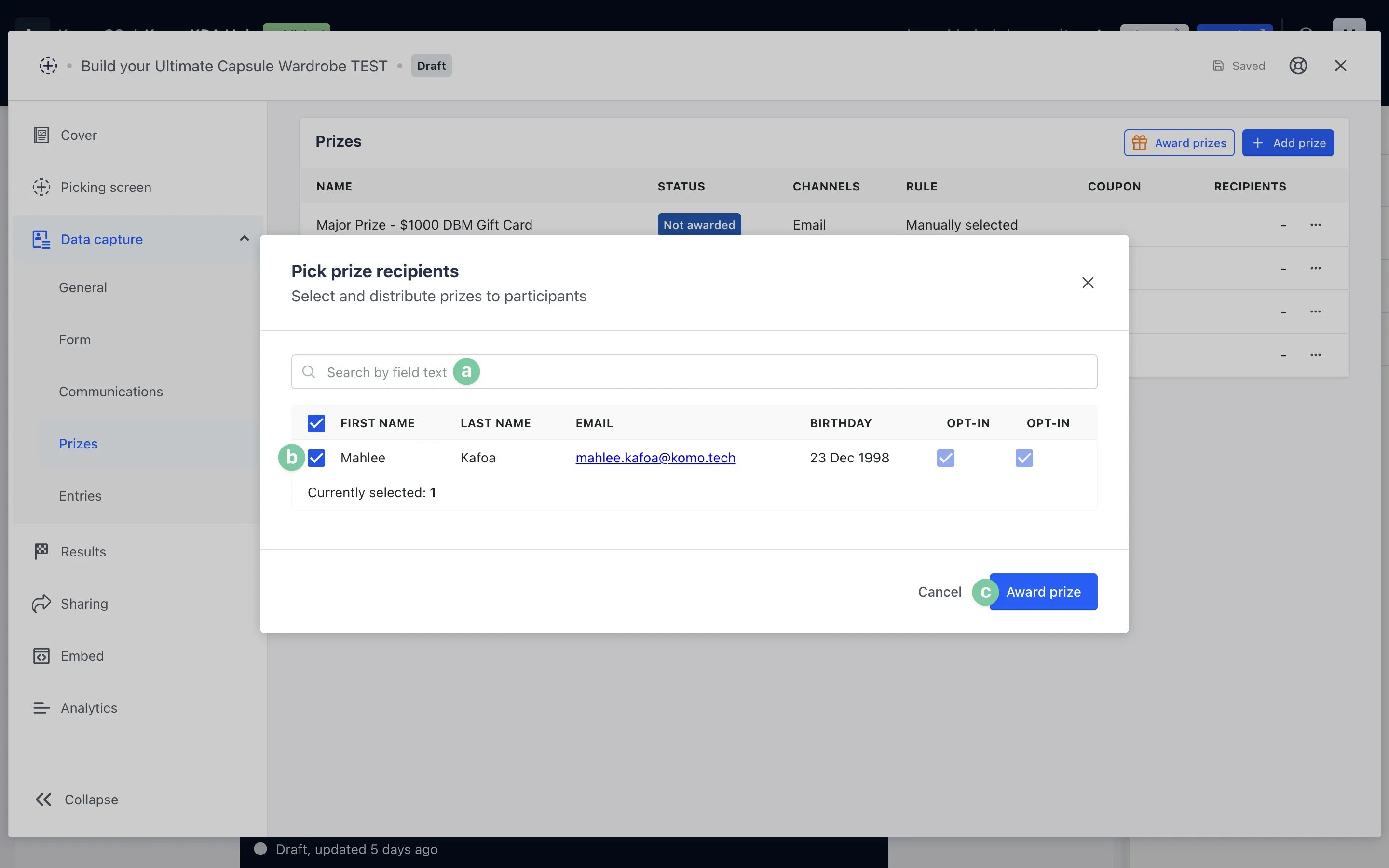 * **(a)** Here you can **search your entrants** for those you wish to award prizes.
* **(b)** Here is where you will **tick** the recipients you wish to award a prize.
* **(c)** Once you've selected all of your prize recipients, click **award prize.**
## Downloading Entries
* **(a)** Here you can **search your entrants** for those you wish to award prizes.
* **(b)** Here is where you will **tick** the recipients you wish to award a prize.
* **(c)** Once you've selected all of your prize recipients, click **award prize.**
## Downloading Entries
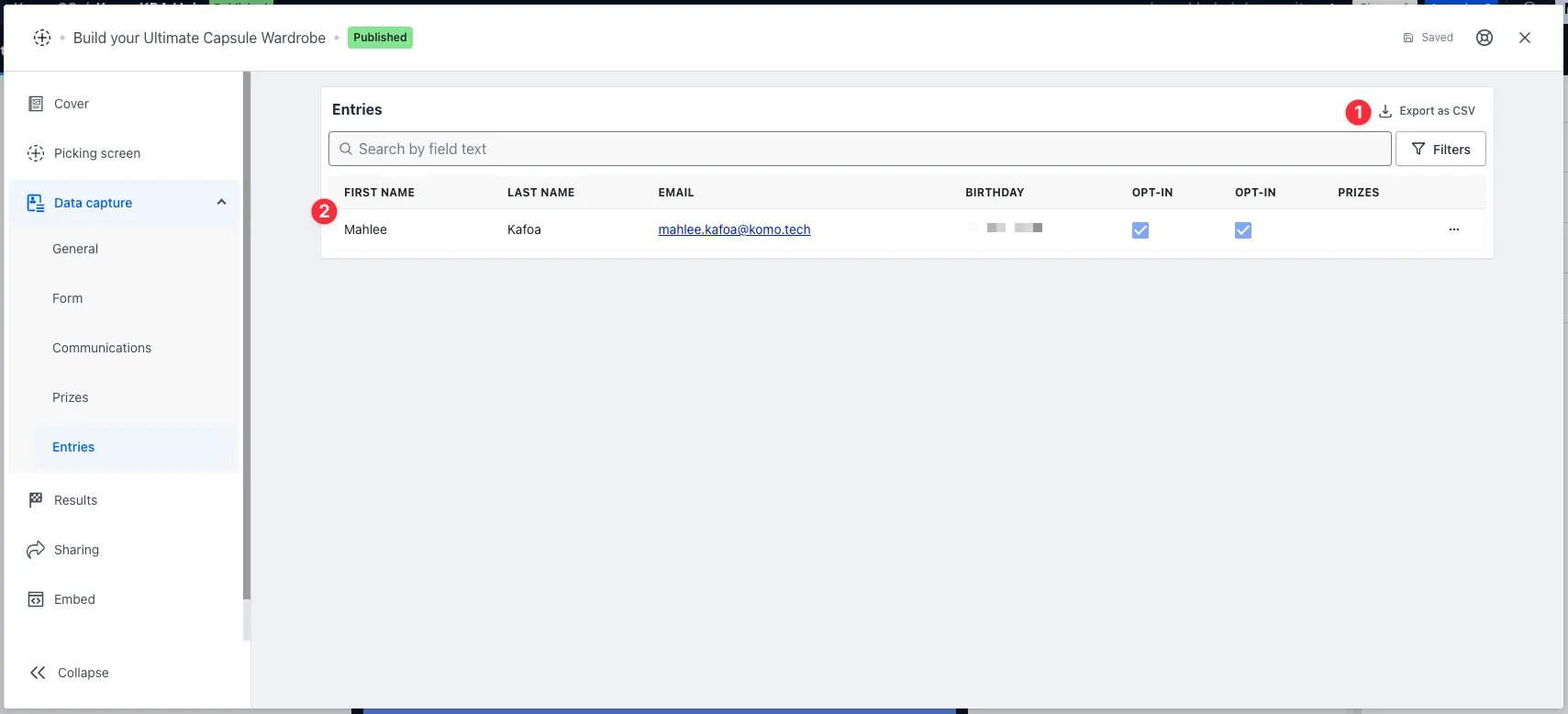 To view all competition entrants, click on **Entries.**
* **(1)** Clicking here will allow you to **download a .CSV file** with an overview of the information entrants provided in the data form, along with their responses to your content.
* **(2)** This area will **populate with data** once people enter your competition.
## Announce Your Winners
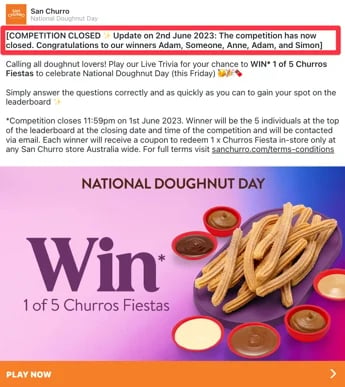
After your competition has ended we highly recommend announcing your winners either on the Engagement Hub, Social Media or EDM. This is a great way to drive people back to your Hub, to participate in future competitions and content. Below is an example of how our customer, San Churro, use the description of their Cards to announce their competition winners!
To view all competition entrants, click on **Entries.**
* **(1)** Clicking here will allow you to **download a .CSV file** with an overview of the information entrants provided in the data form, along with their responses to your content.
* **(2)** This area will **populate with data** once people enter your competition.
## Announce Your Winners
After your competition has ended we highly recommend announcing your winners either on the Engagement Hub, Social Media or EDM. This is a great way to drive people back to your Hub, to participate in future competitions and content. Below is an example of how our customer, San Churro, use the description of their Cards to announce their competition winners!