> ## Documentation Index
> Fetch the complete documentation index at: https://knowledge.komo.tech/llms.txt
> Use this file to discover all available pages before exploring further.
# Integrations & Tag Management
> Comprehensive guides for managing integrations and tags for analytics and tracking in your Engagement Hub
# Tag Management
**Integrations** are what we define as another piece of software that you can connect to the Komo Platform in order to perform a specific action - these are built into our Platform. For example, here is a selection of the available built-in integrations on the Portal and their functions:
* **Adobe Launch Tag Manager** - Connect Adobe Analytics and other technologies to your hub using the Adobe Launch tag manager.
* **Google Tag Manager** - Connect Google Analytics and other technologies to your hub using Google Tag Manager (GTM).
* **OneTrust Cookie Consent** - Connect OneTrust Cookie Consent to your hub to configure branded banners using unique consent approaches.
* **OAuth Single Sign On (SSO)** - Enable SSO integration with an OAuth2-compatible provider like Google or Auth0.
## How do I set up an in-built integration?
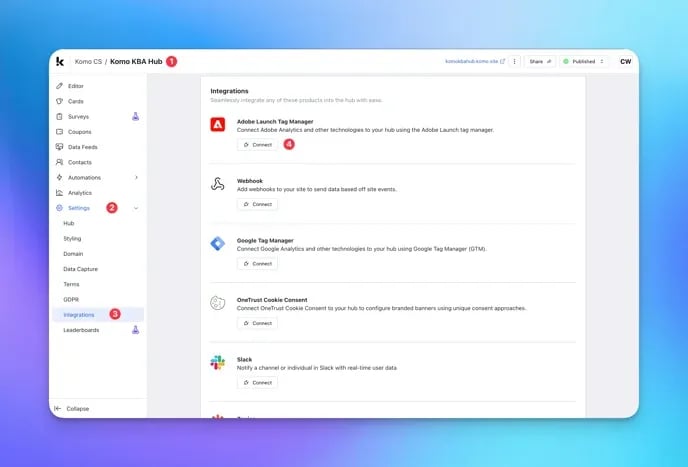 * **(1)** Navigate to your Engagement Hub.
* **(2)** Find the **Settings** tab on the left hand side of your screen.
* **(3)** Click on the **Integrations** tab within Settings.
* **(4)** Find the Integration you wish to set up and click the **Connect** button.
* **(1)** Navigate to your Engagement Hub.
* **(2)** Find the **Settings** tab on the left hand side of your screen.
* **(3)** Click on the **Integrations** tab within Settings.
* **(4)** Find the Integration you wish to set up and click the **Connect** button.
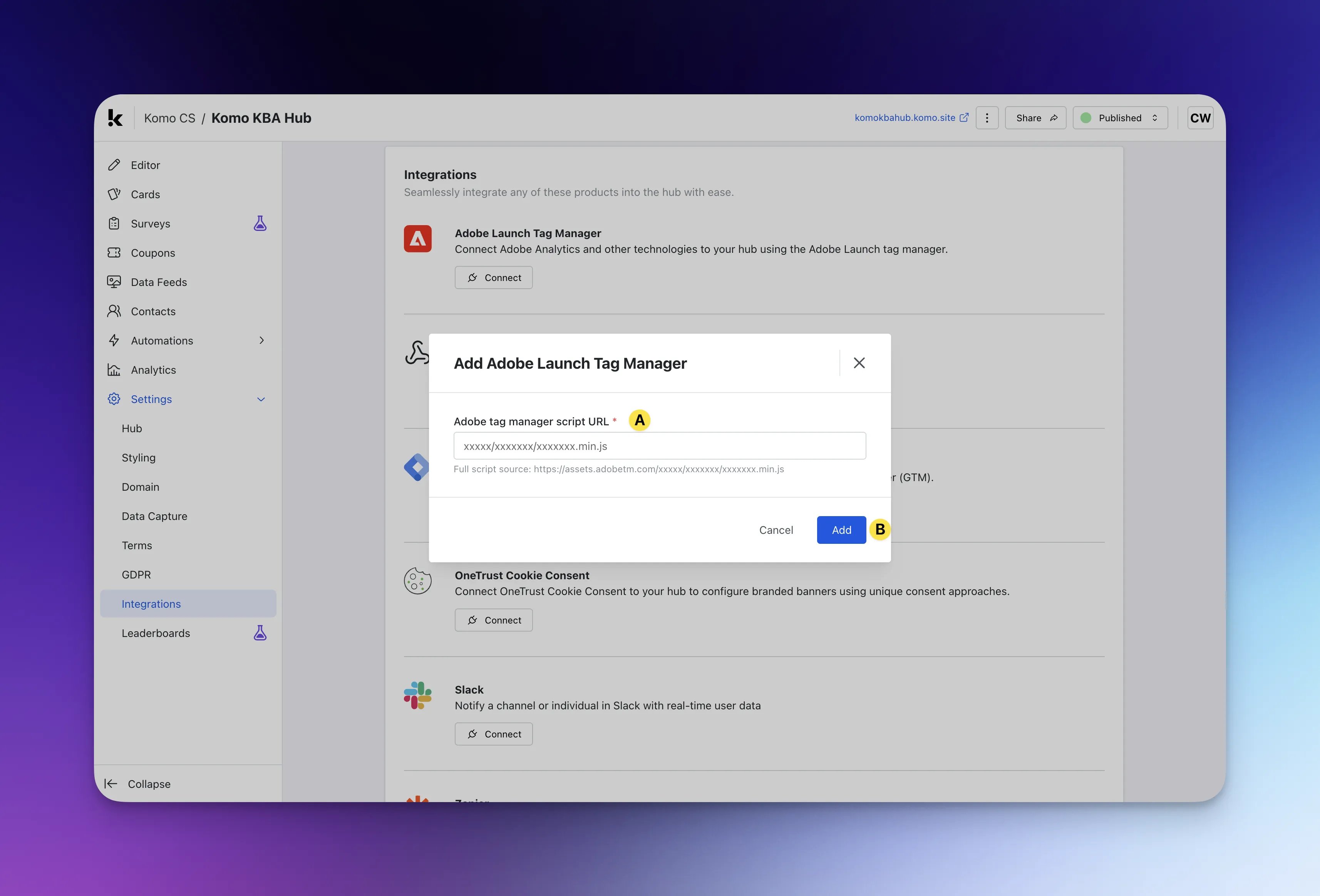 * **(A)** Follow the instructions on-screen to configure your integration. For this step, you will often need some kind of **Client ID, Domain or URL** from the software you are integrating with.
* **(B)** Click **Add** to implement your integration.
## Available Articles
* [Connect Google Tag Manager to your Hub](/integrations-automation/tag-management/connect-google-tag-manager-to-your-hub)
* [Connect Adobe Launch Tag Manager to your Hub](/integrations-automation/tag-management/connect-adobe-launch-tag-manager-to-your-hub)
* **(A)** Follow the instructions on-screen to configure your integration. For this step, you will often need some kind of **Client ID, Domain or URL** from the software you are integrating with.
* **(B)** Click **Add** to implement your integration.
## Available Articles
* [Connect Google Tag Manager to your Hub](/integrations-automation/tag-management/connect-google-tag-manager-to-your-hub)
* [Connect Adobe Launch Tag Manager to your Hub](/integrations-automation/tag-management/connect-adobe-launch-tag-manager-to-your-hub)