
What is it?
The Vii connected app lets your workflows create and load Vii digital gift cards, for example for prize winners. It adds an Issue Vii card workflow step. The step saves a link to each new card in a workflow variable, so you can send it to the contact in an email or SMS.Vii is only available on certain Komo plans. You also need a Vii gift card program. Vii gives you the API username, password and endpoint URL, plus the Store ID, BIN and card design code used in the workflow step. Ask Vii for a digital card design, which returns a link to the card.
How do I set it up?
Step 1: Connect Vii
- Click the Workspace initials in the top right corner, then click Company Settings.
- Click Connected Apps in the left-hand menu.
- Click Connect on Vii.
- Enter the Username, Endpoint (your Vii endpoint URL) and Password from Vii.
- Click Connect.
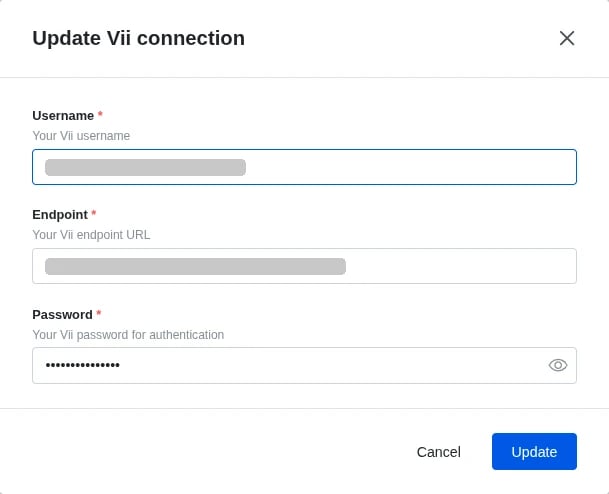
Step 2: Build your workflow
- Create a workflow at the card, hub or workspace level. See Workflows.
- Set the trigger. For prize winners, use Prize Awarded and filter to your gift card prize.
- Search the Steps panel for Vii, drag in Issue Vii card and connect it to the trigger. It’s in the Cards and Coupons group.
- Click the pencil icon on the step and fill in the fields below.
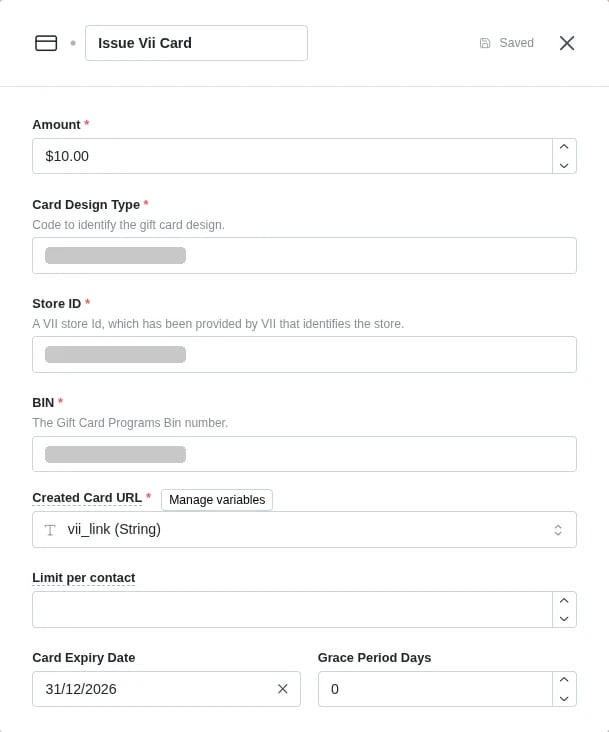
- Add a Send email or Send SMS step after Issue Vii card on the Success path, and include the card link, for example
{{variables.vii_link}}. - Click Save, then Save in the top right-hand corner.
- To start the workflow, click the 3 dots next to it, select Run, then Yes, start it.
Step 3: Check your workflow runs
The step has two paths:- Success: Vii created and loaded the card. The link is saved to your Created Card URL variable.
- LimitExceeded: the contact has already reached Limit per contact, so no card is issued. Connect a step here if you want to tell them, or leave it empty.