
How is the winner determined?
How is the winner determined?
There is no pre-selected winning entry (e.g. “entry #1000 wins”). Each play is an independent probability roll at the moment the user scratches, spins, or watches.For every prize you configure two things:
- A percentage probability — the chance any given play reveals that prize.
- A maximum prize allocation — the total number of times that prize can be won.
The combined probability of all prizes cannot exceed 100%. Any remaining percentage rolls into the failure screen.
Can I set scheduled 'win moments' (e.g. a prize only winnable in a specific time window)?
Can I set scheduled 'win moments' (e.g. a prize only winnable in a specific time window)?
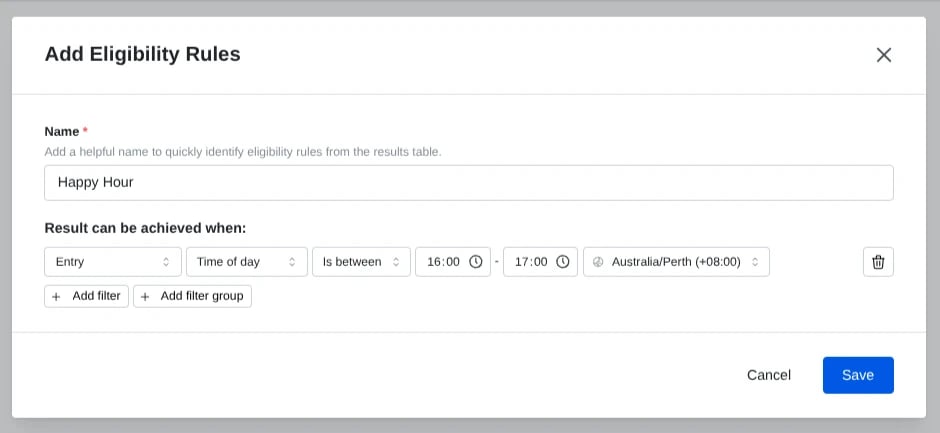
Komo instant win doesn’t use fixed win moments. Every play is an independent probability roll with a maximum prize allocation, as described above.You can restrict when a prize can be won with eligibility rules. In the prize results table, click Add in the prize’s Eligibility Rules column (Edit once rules exist) to open the Add Eligibility Rules modal. Give the rules a name, then under Result can be achieved when: add an Entry filter, choose Date and time or Time of day, then an operator (Is before / Is after / Is between) plus a time zone, and click Save. The rule is checked against the time the entry was made. Fallback results can’t have eligibility rules.Use Date and time for a one-off window between two specific dates and times, for example a prize that can only be won on one day: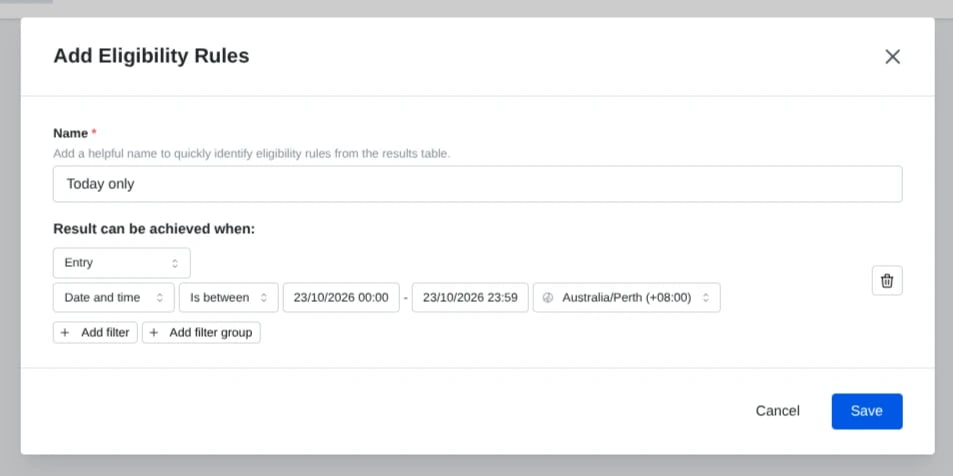
What happens once a prize's allocation is used up?
What happens once a prize's allocation is used up?
The game stays live and users can continue to play. The probability associated with that prize collapses into the failure/fallback screen, so no further users will win that specific prize. Any other prizes with remaining allocation continue to roll as normal.
What if fewer users play than expected — can a prize go unawarded?
What if fewer users play than expected — can a prize go unawarded?
Yes. Because outcomes are rolled per play rather than assigned to a specific entry number, low traffic can mean the prize allocation is not reached within the campaign window.If awarding the prize is important, monitor entry volume against the configured probability and adjust as needed:
- Low traffic — increase the probability so a larger share of plays reveal the prize.
- High traffic — lower the probability to pace the giveaway across the full campaign.
Can the same user win more than once?
Can the same user win more than once?
That depends on the entry limits you configure in the data capture settings for the card. See Add Entry Throttling to a Competition for the entry-limit options. If you allow multiple entries per user (and enable the play again button), each subsequent play is an independent roll subject to the same probability and allocation rules.